



Easy-to-use Campaign Manager
It’s all about engaging your subscribers! Campaign Manager allows you to create attractive and professional campaigns suited to your customers, clients, partners, and subscribers. Choose a pre-designed template from our Template Library or upload your own, personalize your message, and share it. With no technical experience is required, no software to install, and a variety of helpful tools at your fingertips, begin creating your own campaign in minutes.
Modular Templates
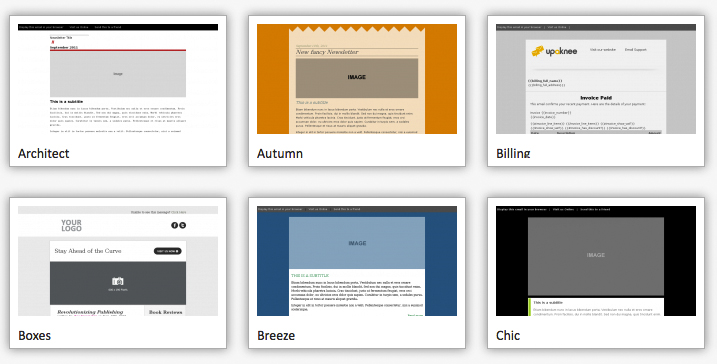
Store templates and images indefinitely, free of limitations and extra charges. Create categories to organize and manage your own libraries. Choose a pre-designed template from our Template Library or upload your own, personalize your message, and share it.
Automated or Triggered Emails
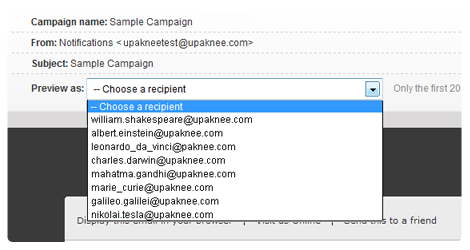
Campaign Manager makes sending your email campaigns easy. Manage your contact list, and send messages to all subscribers or target specific subscribers at will. Not ready to send your message now? No problem, Campaign Manager can accommodate your schedule needs. Schedule a date, recurring dates, and create automated email notifications. Then, sit back and let Campaign Manager handle the delivery.
Start sending powerful email today
Targetted Campaigns
Connect with your subscribers on a more personal level by customizing your campaigns to fit their individual needs. By understanding your subscribers, you can target specific groups based on their interaction and preferences. Professionally manage your lists with notification emails, or set up Autoresponder emails triggered against events such as a sign-up or a birthday. Speak to your subscribers directly and develop strong relationships through effective engagement.
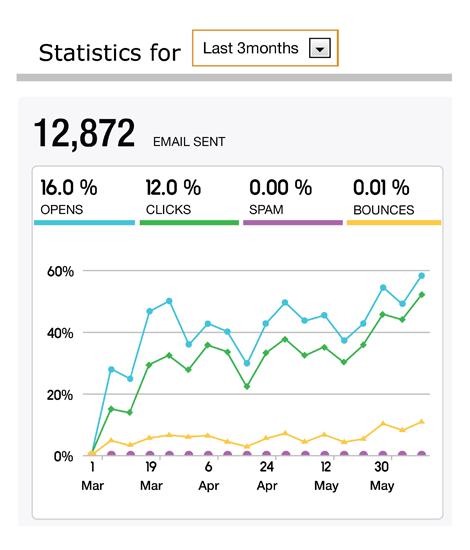
Email analytics and reporting tools
How effective are your email campaigns? Achieve full visibility using Campaign Manager’s email analytics and reporting tools. Our Dashboard interface presents all your campaign data in one place. Track analytics – open rates, click rates, bounced emails, forwards, unsubscribe requests, and so much more, fundamental to understanding campaign success. Utilize this information for precise segmentation, refining messages, engaging subscribers, and generating greater traffic to your website.
Campaign Creation
Target User Groups
Campaign Manager makes it easy to segment users within contact lists in an effort to target users and groups based on their interests, preferences, location, etc.
A/B Split Testing
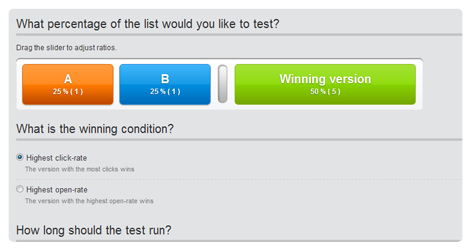
Test various components of a campaign to determine its effectiveness by varying these components.
Preference Centre
Create a Preference Centre, on your website or Facebook page, for your subscribers to identify exactly what they wish to receive from you.

Multiple Users
Upaknee allows you to add multiple users to your account. Depending on your needs, you are provided with the additional benefit of setting user permissions for each user.

HTML to Text
Easily create a text version of your campaign with one simple click.
RSS to HTML
Integrate RSS feeds and XML feed sources from your blog or Twitter with your email campaigns. Keep your subscribers informed and connected.
Simple Sending
Customize Content
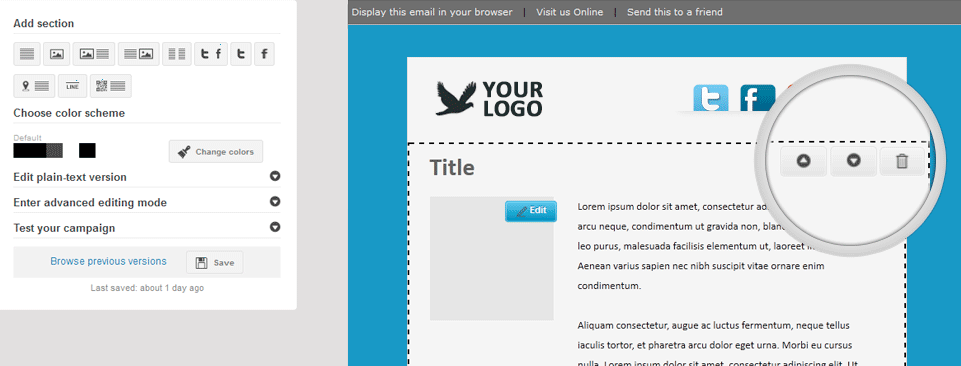
Fully customize your campaigns with the point-and-click editor. Add new image/text sections to your template or delete existing ones, and configure your template easily by moving these sections up or down as desired.
Mix and Match Content
Campaign Manager features an all-inclusive editor that lets you mix, match and re-arrange content blocks in your template to best suit your message.
Crop and Resize Images
Add images to your campaign by uploading them from your computer or inserting existing images from your Image Library. All images can be easily cropped and resized with a dragging tool to fit perfectly within your desired template.
Feature
Text goes here.
Feature
Text goes here.
Feature
Text goes here.
Reporting and Analytics
Feature
Text goes here.
Feature
Text goes here.
Feature
Text goes here.
Feature
Text goes here.
Feature
Text goes here.
Feature
Text goes here.